
Blog
How to Use TEREA Sticks with IQOS ILUMA: An Easy Guide


How to Use TEREA Sticks with IQOS ILUMA: An Easy Guide
IQOS ILUMA works differently from earlier IQOS devices. Instead of a traditional heating blade, the system uses induction heating and compatible TEREA sticks.
The good news is that it takes only a few steps. IQOS ILUMA was designed to work with TEREA sticks, so you do not need to deal with the heating blade found in some older IQOS models.
In this guide, we will walk through the basic process, from preparing the device to removing the used TEREA stick.
Important: TEREA contains nicotine, which is addictive, and IQOS ILUMA is not risk-free. This information is intended for adults who already use tobacco or nicotine products. Follow the manufacturer’s instructions and applicable UAE laws.
Before You Start
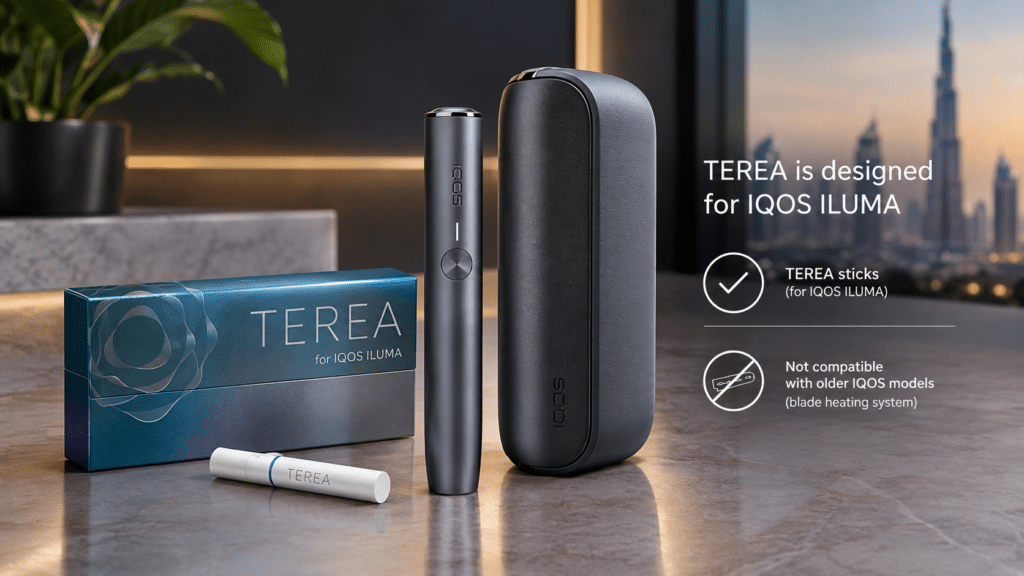
You will need two main things:
Also check that your ILUMA holder has enough battery before you start. If the holder needs charging, place it inside the pocket charger first.
One important point is compatibility. TEREA sticks are made for IQOS ILUMA devices. Do not use them with older IQOS models that use a blade heating system.
How to Use TEREA Sticks with IQOS ILUMA in UAE
Check the Battery
Remove the holder from the pocket charger and check whether it is ready to use.
If the holder has little or no charge, put it back in the pocket charger and charge it.
If you are using the device for the first time, we recommend charging the pocket charger before use.
Take One Fresh TEREA Stick
Open your TEREA pack and take out one unused stick.
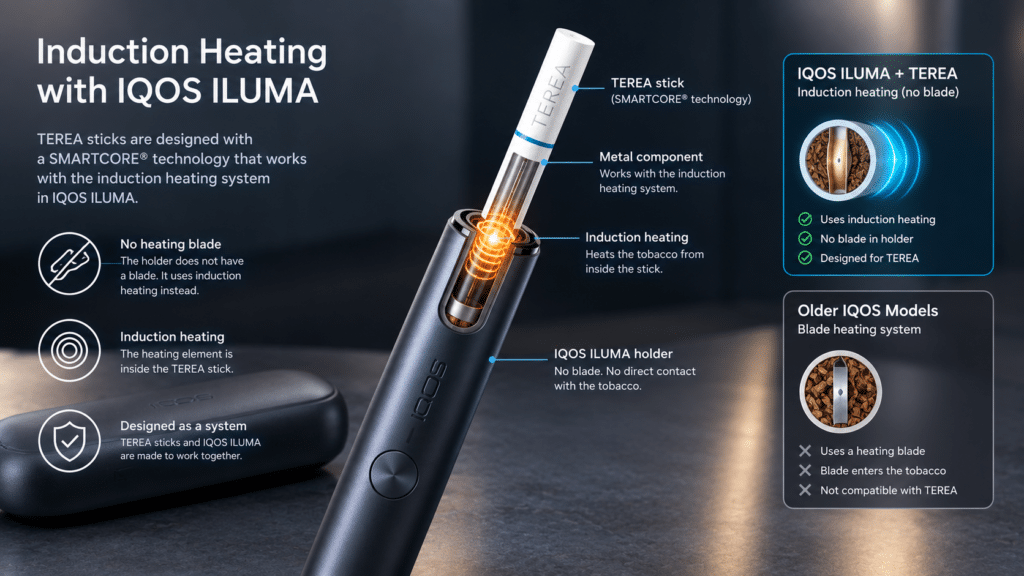
Try not to bend or damage it. The TEREA stick contains a metal component that works with the induction heating system in IQOS ILUMA.
Do not open or modify the stick.
Insert TEREA into the Holder

Now take the IQOS ILUMA holder and gently insert the TEREA stick.
You don’t need to force it in. Push it in until it reaches the indicated line on the filter.
The TEREA logo should remain visible after it has been inserted correctly.
This differs from older blade-based IQOS devices because no blade needs to enter the tobacco stick.
Let IQOS ILUMA Start Heating
Once you insert the TEREA stick, the device can begin heating automatically if Autostart is enabled.
You will normally feel a vibration from the holder while the device prepares. The lights also indicate that heating is in progress.
When the device signals that it is ready, you can begin the experience.
Use the Device Normally
Once the holder indicates that it is ready, use the TEREA stick according to the manufacturer’s instructions.
The important difference here is how the tobacco is heated.
IQOS ILUMA uses induction heating. The heating element is built into the TEREA stick rather than using a blade inside the holder.
This is why TEREA and IQOS ILUMA are designed to work together as a system.
Pay Attention to the End Indicator
You do not have to guess when the experience is nearly finished.
The holder provides an indication, including vibration and light signals, as the experience approaches its end.
When the device indicates that the experience is finished, remove the TEREA stick.
Remove the Used Stick
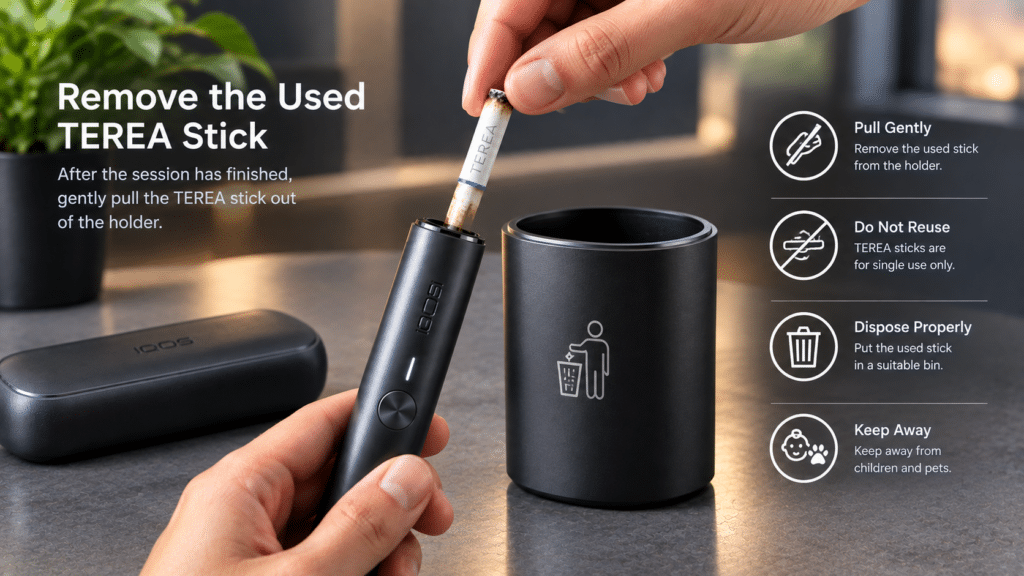
When you’re finished, gently pull the TEREA stick out of the holder.
Do not reuse the same stick. TEREA sticks are designed for single use.
After removing it, dispose of the used stick appropriately.
Why TEREA Is Different from Older IQOS Sticks
If you have used an older IQOS device, you may notice the ILUMA experience is different.
Older IQOS generations used a heating blade that entered the tobacco stick. IQOS ILUMA uses induction technology instead.
The heating element is located inside the TEREA SMARTCORE stick. The ILUMA holder heats it without inserting a blade into the tobacco.
Because of this difference, TEREA and older HEETS-compatible IQOS devices are not interchangeable.
Always check your device model before choosing a tobacco stick.
Can You Use TEREA with an Older IQOS?
No. TEREA sticks are intended for IQOS ILUMA devices.
Older IQOS models that use a blade heating system are designed for compatible sticks such as HEETS, rather than TEREA.
Using the wrong type of stick can potentially damage an older device, so checking compatibility is important.
What Happens If the TEREA Stick Is Inserted Incorrectly?
The simple solution is to remove it carefully and check the insertion position. Do not push the stick past the indicated line, and never force it into the holder.
If the device still shows an error, refer to the manufacturer’s troubleshooting instructions for your specific ILUMA model.
Things You Should Not Do with TEREA
There are a few simple precautions worth remembering:
- Do not use TEREA in an older blade-based IQOS device.
- Do not reuse a TEREA stick.
- Do not cut, open, or dismantle the stick.
- Do not force the stick into the holder.
- Keep unused and used sticks away from children and pets.
These small precautions can help prevent incorrect use and unnecessary device problems.
TEREA and IQOS ILUMA: Quick Overview
| Feature | TEREA + IQOS ILUMA |
| Designed for | IQOS ILUMA |
| Heating method | Induction heating |
| Heating blade | No blade in the holder |
| Stick type | TEREA SMARTCORE stick |
| Reusable stick | No |
| Insertion | Gently insert up to the marked line. |
| After use | Remove and dispose of the stick. |
Common Questions About TEREA and IQOS ILUMA
How do I put a TEREA stick into IQOS ILUMA?
Gently insert the TEREA stick into the ILUMA holder until it reaches the marked line on the filter. Do not force it further inside.
Does IQOS ILUMA automatically heat TEREA?
If Autostart is enabled on your device, inserting a TEREA stick can start the heating process automatically. The holder will indicate when it is ready.
Can I use TEREA twice?
No. A TEREA stick is designed for one use only. Once you finish, remove and dispose of the stick.
Can I use TEREA with an old IQOS?
No. TEREA sticks are designed for IQOS ILUMA. Older IQOS devices that use a heating blade require compatible sticks intended for those models.
Does IQOS ILUMA have a heating blade?
No. Unlike older blade-based IQOS models, ILUMA uses induction heating. The compatible TEREA stick includes the heating element.
Why does TEREA have a metal part?
The metal component inside the SMARTCORE stick works with the induction heating system used by IQOS ILUMA. This is one reason TEREA is designed specifically for ILUMA.
How do I know when the TEREA experience is finished?
The ILUMA holder vibrates and lights up as the experience approaches its end. Follow the device’s indicator and remove the stick when it is finished.
Can I clean the heating blade of an IQOS ILUMA?
IQOS ILUMA does not use the traditional heating blade found in older IQOS devices. Always follow the manufacturer’s cleaning and maintenance instructions for your particular ILUMA model.
What should I do if my TEREA stick gets damaged?
Do not try to repair, open, or modify a damaged TEREA stick. Dispose of it appropriately and use a new, intact stick if applicable.
Can children use TEREA or IQOS ILUMA?
No. TEREA contains nicotine and is intended only for adults who meet the legal requirements for tobacco or nicotine products in their jurisdiction.
Final Thoughts
Using TEREA with IQOS ILUMA is fairly straightforward once you understand the difference between ILUMA and older IQOS devices.
Start with a charged holder, insert a fresh TEREA stick gently to the marked line, and wait for the device to indicate it is ready. When you’re finished, remove the stick and dispose of it.
The biggest thing to remember is compatibility. TEREA is designed for IQOS ILUMA, while older IQOS models use a different heating system.