
Blog
How to Use IQOS ILUMA Step by Step: A Simple Guide for Dubai & UAE


How to Use IQOS ILUMA Step by Step: A Simple Guide for Dubai & UAE
If you have recently started using IQOS ILUMA, the initial sessions might feel a bit unfamiliar. This device operates differently compared to older blade-based IQOS models; therefore, knowing the correct procedures for preparation, inserting the stick, and starting or ending a session will make your experience much smoother and more comfortable. This IQOS ILUMA guide explains its operation in simple steps. It is designed for adult users in Dubai and across the UAE who are interested in learning how the device works and how to use it correctly.
What You Need Before Starting
Before using your IQOS ILUMA, make sure you have two things ready:
- Charged IQOS ILUMA device
- Compatible TEREA SMARTCORE stick
IQOS ILUMA is designed for use with compatible TEREA sticks. Older HEETS sticks are designed for blade-based IQOS devices; therefore, they should not be used interchangeably with ILUMA.
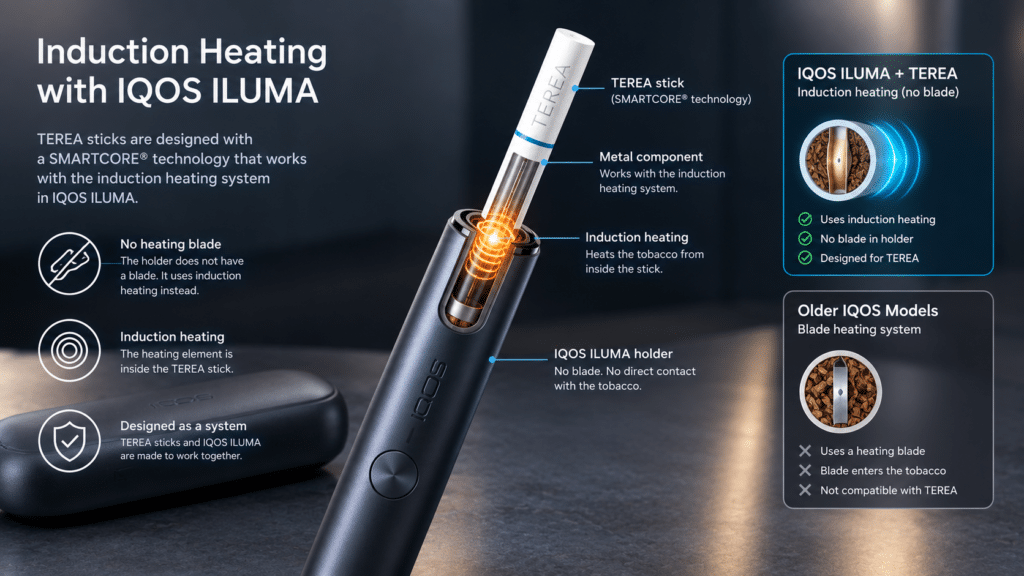
A key difference lies in its heating system. Instead of conventional heating blades, IQOS ILUMA utilizes ‘induction heating’ technology. Thanks to this unique design, there is no need to insert a blade into the tobacco stick during use.
Step 1: Charge Your IQOS ILUMA

If you are using the device for the first time, please charge it fully before use. For the standard IQOS ILUMA (comprising a holder and a pocket charger), the holder can be placed inside the pocket charger when charging is required. To charge the pocket charger itself, use the provided charging cable and a suitable power adapter. It is advisable to fully charge the device before the first session. This helps avoid having to stop midway through a session due to a low battery. For regular use, check the indicator lights before inserting a TEREA stick; this allows you to see how much charge remains.
Step 2: Check the Holder
Remove the holder from the pocket charger and check its status.
For the standard IQOS ILUMA, the indicator lights show whether the holder has sufficient charge for the next session. If there is no charge, place it back in the pocket charger before use.
This small check can save you from inserting a fresh TEREA stick when the device is not ready.
Step 3: Prepare a TEREA Stick
Remove a TEREA stick from the pack.
Handle it with care and keep the stick intact. Do not cut, open, or attempt to alter any part of it.
TEREA sticks are designed specifically for the ILUMA heating system. They contain a metal element that works with the induction system; therefore, they should be used only in the prescribed manner.
Never try to use a used TEREA stick for another session.
Step 4: Insert the TEREA Stick Correctly
Hold the IQOS ILUMA holder upright and gently insert the TEREA stick.
Push the stick in until the mark on the filter aligns with the top edge of the holder. Do not force it beyond the indicated position.
Once the stick is correctly inserted, the device will detect it and begin preparing for the session if the ‘AutoStart’ feature is enabled.
You will feel a vibration and the indicator lights will turn on, signaling that the stick has started heating up.
Step 5: Wait for the Heating Process
Do not start using the device immediately after inserting the stick.
Allow some time for the holder to complete the pre-heating process.
For the standard ILUMA model, the device provides vibration and light signals at this stage. When the holder vibrates again and the light becomes steady, it is ready for use.
It is important to wait for this signal, as the heating process needs to reach the correct stage before use.
Step 6: Start Your Session
You can start once the holder is ready for use.
Pull gently rather than forcefully. There is no need to press down on or move the TEREA stick while using the device.
The ILUMA system heats the compatible stick using induction technology. Unlike regular cigarettes, the tobacco is heated rather than burned.
The user experience may vary slightly depending on the device model and the stick used.
Step 7: Pay Attention to the End-of-Session Signal
Your IQOS ILUMA provides a warning just before the session ends.
On supported models, the holder vibrates and a light flashes to indicate that very little time or only a few ‘puffs’ remain in the session.
Receiving this signal means the session is nearing its end.
There is no need to continue using the ‘stick’ once the device signals that the session is ending.
Step 8: Remove the Used TEREA Stick
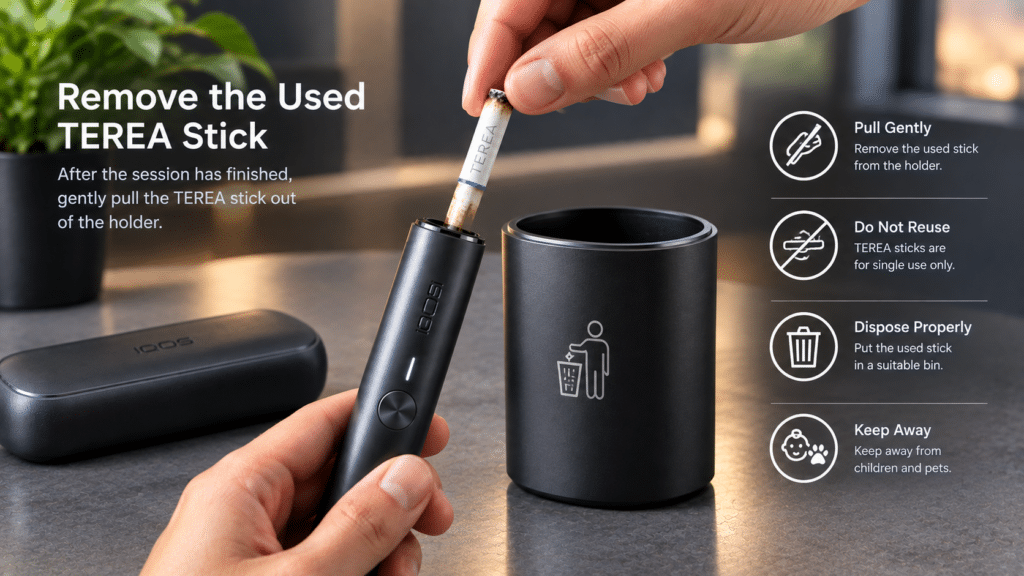
After the session ends, remove the TEREA stick from the holder.
Pull it out gently; avoid twisting or damaging the stick.
Used TEREA sticks are designed for single use only. Do not reinsert the same stick into the device.
After removal, allow it to cool down and dispose of it responsibly in accordance with local waste disposal regulations.
Step 9: Put the Holder Back in the Pocket Charger
After removing the used stick, place the holder back into the pocket charger.
This allows it to recharge and keeps the device ready for the next use.
If you use IQOS ILUMA regularly, making a habit of placing the holder in the charger immediately after use will help avoid issues with a depleted battery later on.
Does IQOS ILUMA Need Cleaning?
One of the key differences between the IQOS ILUMA and older blade-based models lies in its internal heating design.
Since the ILUMA utilizes induction technology and the compatible TEREA sticks are specifically designed for this technology, it does not feature a heating blade; consequently, the regular cleaning required for older IQOS devices is no longer necessary.
This does not mean that the exterior of the device can be ignored. Keep the exterior clean and dry, and ensure that no liquid enters the holder or pocket charger.
If you notice any unusual issues, do not attempt to open the device yourself; instead, follow the troubleshooting procedures recommended for your specific ILUMA model.
Can You Use HEETS With IQOS ILUMA?
No. HEETS and TEREA are designed for different IQOS heating systems.
IQOS ILUMA is designed for use with compatible TEREA SMARTCORE sticks. In contrast, HEETS were created for earlier-generation ‘blade-based’ IQOS devices.
Using the wrong type of stick can cause issues, and doing so is not recommended.
If you switch from an older IQOS model to the ILUMA in Dubai or anywhere else in the UAE, this is one of the first differences you should understand.
Common Mistakes New IQOS ILUMA Users Make
Using the wrong tobacco stick
This is one of the easiest mistakes to avoid. Always check that the stick is compatible with your ILUMA model.
Pushing the stick too far
Insert the TEREA stick only to the indicated line. There is no reason to force it further.
Starting before the device is ready
Wait for the correct vibration and light signal before beginning the session.
Reusing a TEREA stick
TEREA sticks are single-use. Once a session is finished, remove the used stick and replace it with a new one next time.
Trying to clean inside the Holder
The ILUMA heating system does not use the traditional blade found in older models. Avoid inserting sharp objects or attempting to dismantle the Holder.
Ignoring battery status
A low Holder battery can interrupt your next session. Returning the Holder to the Pocket Charger after use is an easy habit that helps keep it ready.
IQOS ILUMA Tips for Users in Dubai and the UAE
As the weather in Dubai remains quite warm for most of the year, it is important to ensure your device is stored correctly.
Keep your IQOS ILUMA and TEREA sticks in a cool, dry place. Avoid leaving the device for extended periods inside a parked car or in any location exposed to intense heat.
While carrying the device around in Dubai, keep the holder and pocket charger protected from water, excessive heat, and physical impact.
Additionally, it is best to keep the TEREA pack sealed or closed until you are ready to use a stick; this helps maintain the quality of the unused sticks.
How the ILUMA Experience Differs From Older IQOS Models
If you have previously used an older IQOS device, the ILUMA might feel somewhat different right from the start.
Older models utilized a blade that was inserted into the tobacco stick. In contrast, the ILUMA employs induction technology, and the compatible TEREA stick has been designed specifically with this technology in mind.
This means it does not feature a conventional blade that inserts into the tobacco, nor does it require the complex cleaning routines associated with earlier generations of devices.
As a result, the usage process has become much simpler: charge the device, insert the compatible stick up to the designated mark, wait for the signal indicating it is ready for use, use it, and remove the stick once the session is over.
Which IQOS ILUMA Models Can You Use?
The ILUMA series offers models in various designs to cater to diverse preferences and tastes.
The standard IQOS ILUMA features a separate holder and pocket charger. While the ILUMA PRIME follows the same core holder-based concept, it boasts a more premium design; in contrast, the ILUMA ONE integrates these key components into a compact ‘all-in-one’ single unit.
Depending on the version, additional smart features have been incorporated into the new ILUMA i models.
Despite differences in design and features, the core principle remains the same: use compatible SMARTCORE/TEREA sticks designed for the specific ILUMA generation and follow the instructions for your model.
A Simple IQOS ILUMA Routine
For beginners, the whole process can be remembered in a few simple actions:
Charge → Check → Insert → Wait → Use → Remove → Recharge
That is essentially the basic routine.
Once you become familiar with the vibration and light signals, operating the device becomes much more straightforward.
Frequently Asked Questions
How do I use IQOS ILUMA for the first time?
Start by fully charging the device. Turn it on if required, check the Holder battery, and insert a compatible TEREA stick up to the indicated line. Wait for the device to signal that heating is complete before beginning the session.
Can I use TEREA sticks with IQOS ILUMA?
Yes. TEREA sticks are designed for the IQOS ILUMA heating system. Always check compatibility with your exact ILUMA model before use.
Can I use HEETS in IQOS ILUMA?
No. HEETS are designed for earlier blade-based IQOS systems. IQOS ILUMA is designed to work with compatible TEREA SMARTCORE sticks.
Does IQOS ILUMA need regular blade cleaning?
ILUMA does not use the traditional heating blade found in older IQOS models. Its induction-based design means there is no blade to clean after each session.
How do I know when my IQOS ILUMA is ready?
After inserting the TEREA stick, the Holder provides vibration and light signals during heating. When the device gives the ready indication, you can begin the session.
What should I do after using a TEREA stick?
Remove the used stick from the Holder after the session, allow it to cool, and dispose of it appropriately. Then return the Holder to its Pocket Charger if it needs charging.
Final Thoughts
Once you grasp the basic process, learning how to use IQOS ILUMA step-by-step is quite simple. The most important steps include using the correct TEREA stick, inserting it up to the designated mark, waiting for the signal that it is ready for use, and removing the used stick after the session.
For adult users in Dubai and across the UAE, knowing these basics will make your initial sessions much easier. If you are switching from an older IQOS device to a new one, pay special attention to the transition from ‘blade heating’ to the ‘ILUMA induction system’ and the differences between TEREA and HEETS.